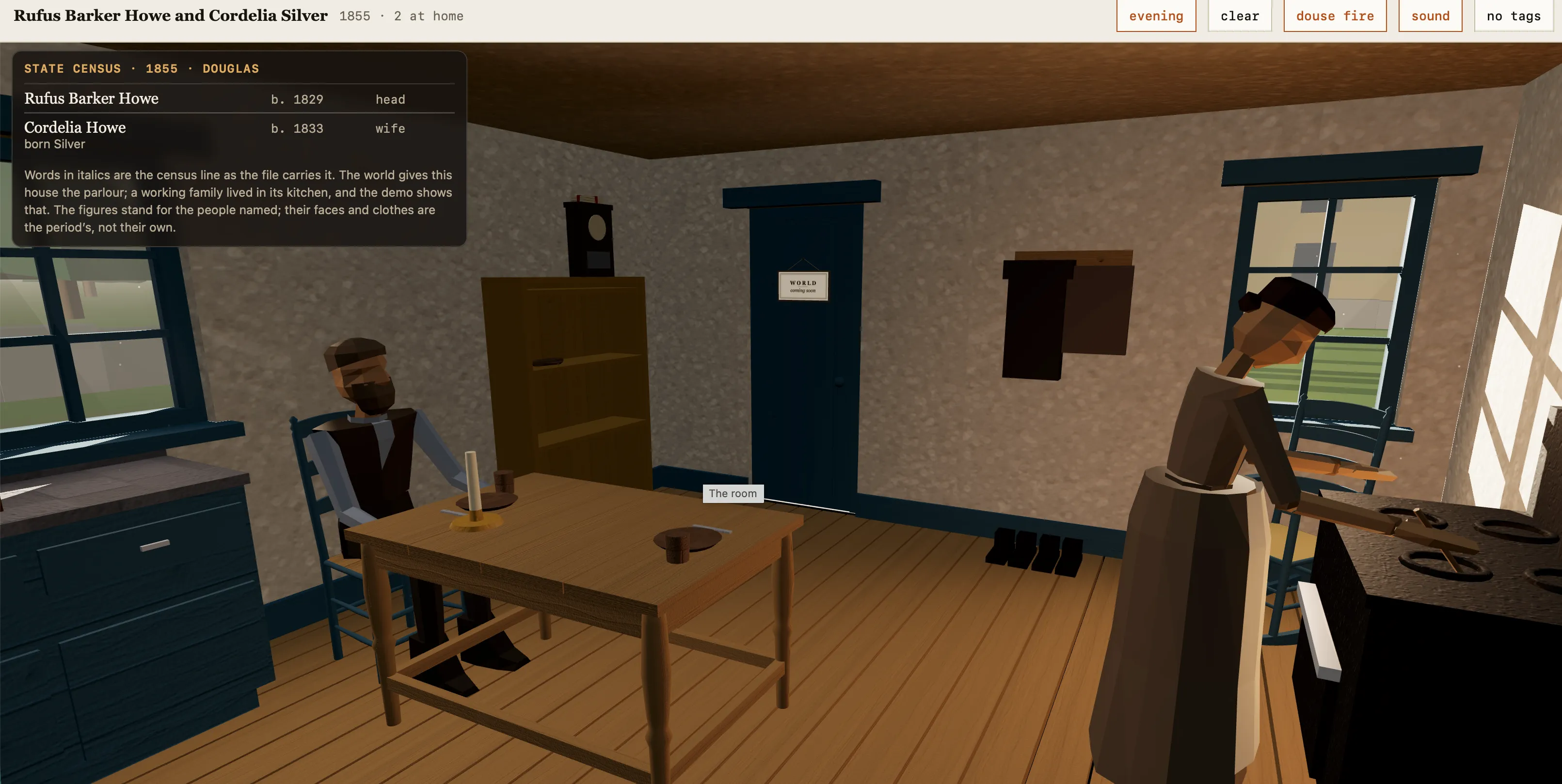
A present-day man among his 1800s New England ancestors by candlelight
WITNESS
Sign in
A Genealogy Platform

Your ancestors witnessed history.
Witness helps you see them.

Witness is a genealogy app for iPhone, iPad and the web that turns a family tree you have already built into something you can question. Import the GEDCOM file your current software exports, and Witness answers questions about your own ancestors, writes sourced biographies of their lives, and maps where those lives were recorded — checking the whole tree for errors as it goes, and never altering the tree you keep elsewhere. Out now on the App Store.

Download on the App Store $19.99 a year · 1 week free
iPhone and iPad, or in your browser at app.witnesslives.com
Why We Built This

"I spent decades building large expert systems for healthcare — the kind of work where incomplete records, conflicting data, and missing links aren't edge cases, they're the job. A few years ago I started wondering why genealogy software hadn't caught up. WitnessLives is my answer."

— Rufus Howe, Founder
Storytelling

Ask your tree a question, instead of just scrolling it.

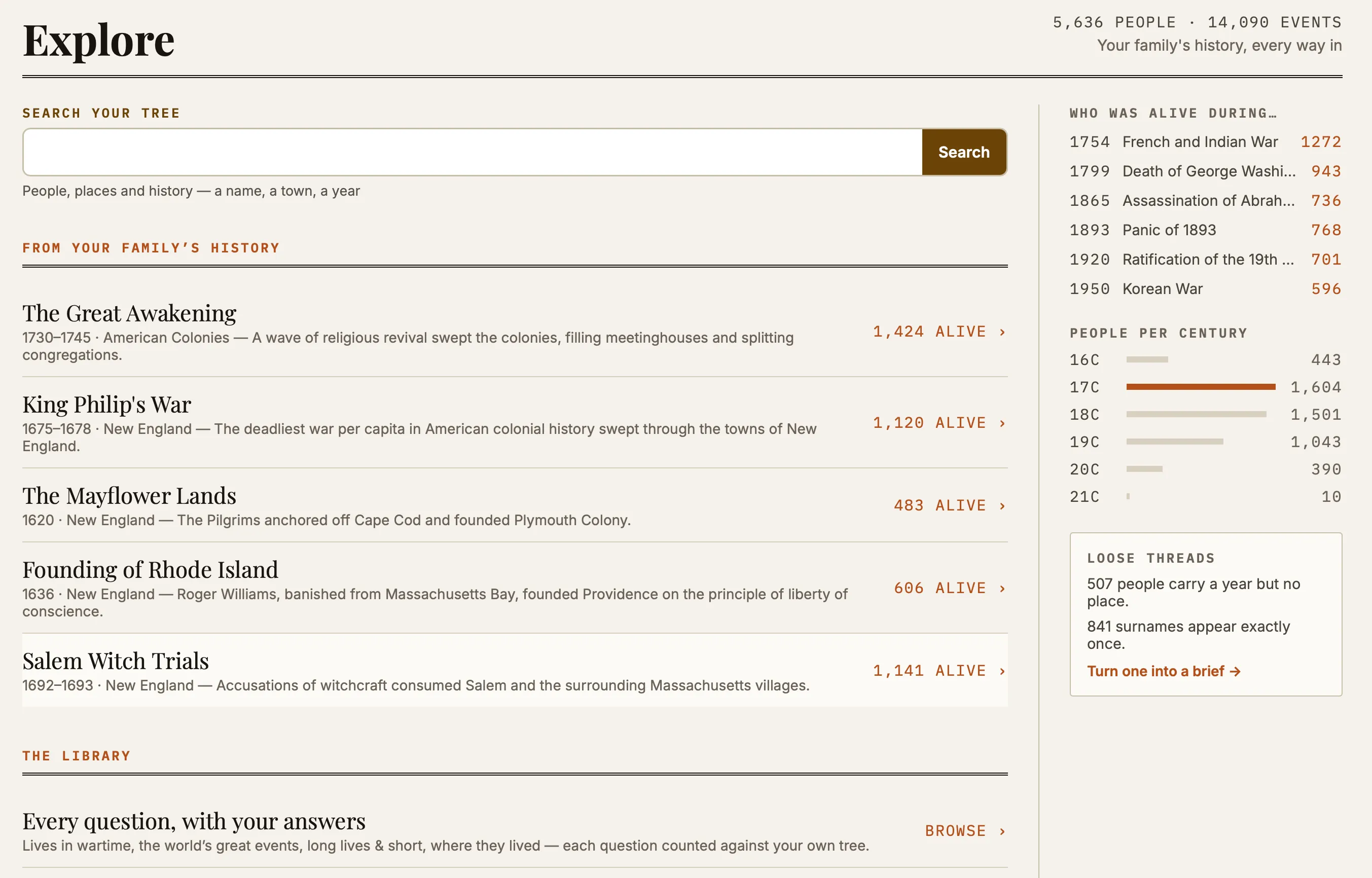
Witness includes a library of 39 ready-made questions you can ask of your own family data — who was alive during the American Revolution, who lived through the Great Depression, whose life was the most remarkable — alongside 48 historical events you can check your family against, listed by century. Every question shows a real, live count from your own tree before you open it, and the library grows without waiting for an app update.

Temporal
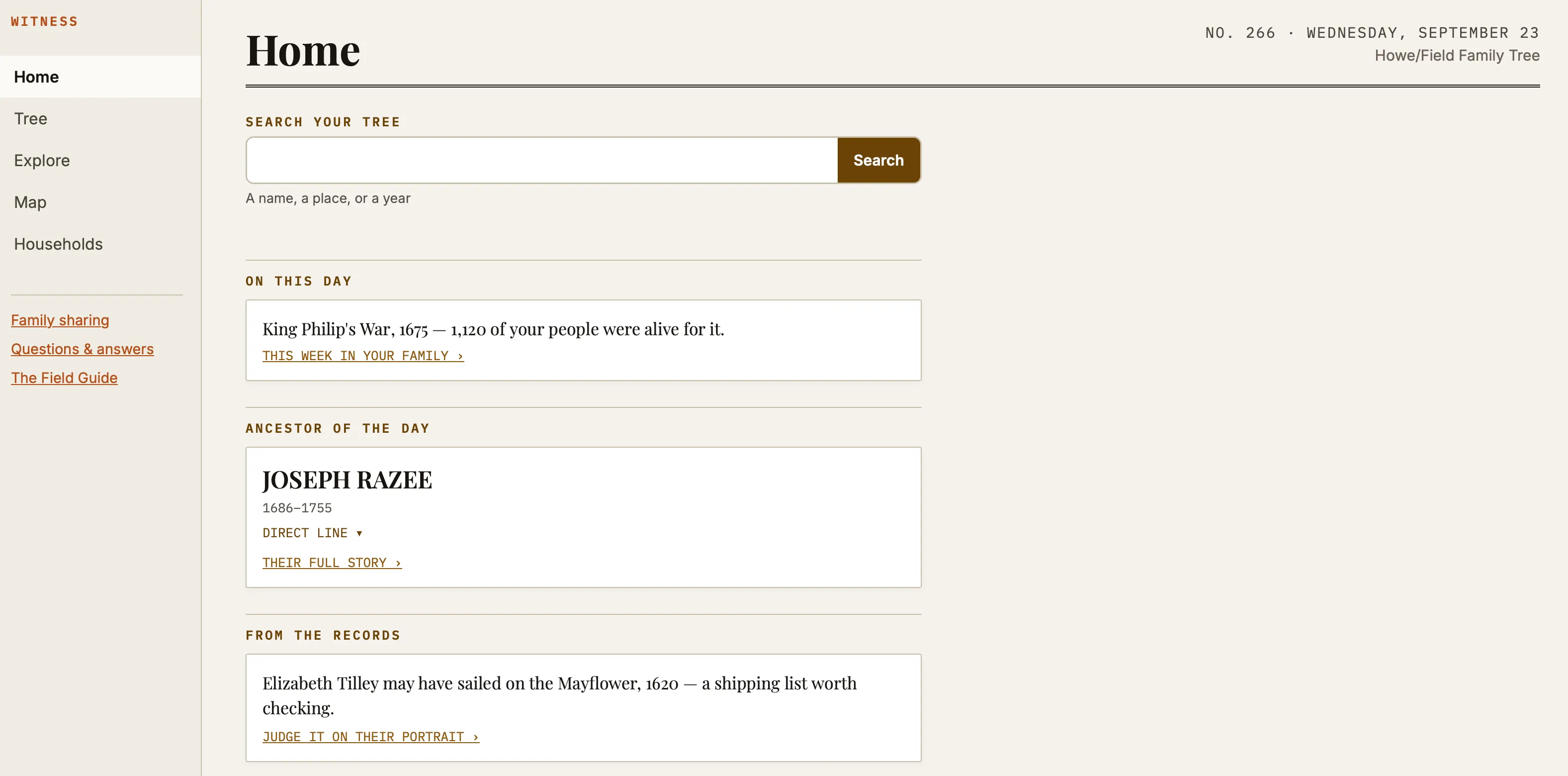
Who in my family was alive during King Philip's War?
Example answer — a list of ancestors alive that year, with names, ages, and locations.
Remarkable Lives
Who was the most remarkable person in my family tree?
Example answer — a specific ancestor, surfaced with a short, sourced biography.
Research Brief
I've hit a brick wall. What should I research next?
Example answer — a structured brief with prioritized questions and named archives.
This Week
What should I know about my family this week?
Example answer — a daily surfacing of anniversaries and matches from your own tree.
Family Tree Health

A rigorous research companion, not just a place to store names.

Every fact in Witness carries its source and citation, carried over directly from your GEDCOM file.

A built-in Tree Health check — built on 22 professional-grade rules adapted from FTAnalyzer, a tool well known among serious genealogists — quietly flags problems as you build, instead of surfacing them after years of work.

Most tools treat the finished tree as the end product. We treat it as the beginning of the question.

Example check
A person recorded as dying before they were born.
Example check
A couple married while one of them was still a child.
Example check
Duplicate facts recorded twice for the same event.
Immersive Insights

See your family somewhere, not just on a chart.

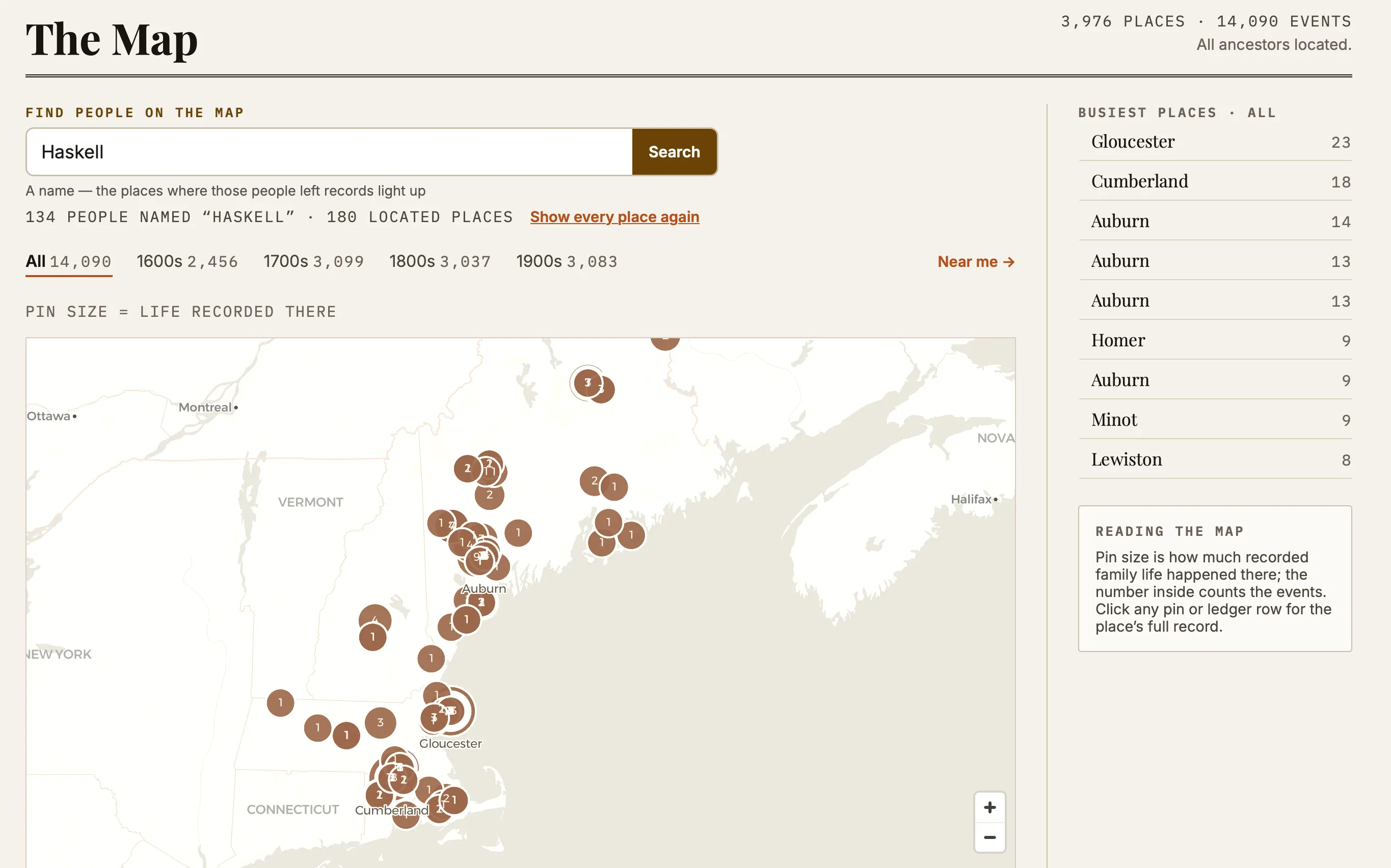
The Map plots every place your ancestors' recorded events happened. Its Near me mode uses your phone's location to show which ancestors or historical events are close to where you're actually standing.

Geographic
I'm standing in this cemetery — is anyone here related to me?
Example answer — a confirmed match nearby, with distance and relationship.
In development

Family Street View

We're building a fully immersive Family Street View — walking from house to house through the generations, your ancestors present in the rooms around you, a time slider that ages them as you move through their world. Contextual details show period-accurate clothing and household objects. This one is worth watching.

An early look at the world Family Street View will put you inside
A glimpse of the world it will put you inside
The Room
Each household is a period-accurate interior, with ancestors present as figures sized to their age.
The Time Slider
Move it forward or back and the household ages with it — children grow, figures fade at their year of death.
The Back Door
Leave through it and you're in the households of the prior generation, one threshold deeper into the past.
A proof of concept exists today. We're building the production version now.
What's Here, and What's Coming

A plain list, so you know what you're getting.

Available now
GEDCOM Import
Upload your existing tree file. No rebuilding from scratch.
Tree Health
Flags likely errors in your data, like a person married before they could walk.
Citations & Sources
Every fact shows exactly where it came from.
Query Library
39 ready-made questions, plus 48 historical events to check your family against.
Map
See where your ancestors' recorded events actually happened.
Near me
On the Map: find out which ancestors or events are near where you're standing right now.
Research Brief
A prioritized starting point when you've hit a brick wall.
Ancestry Deep Links
Jump straight back to the original record on Ancestry.com.
Home & Explore
Daily surfacing of anniversaries and matches from your own family.
This Week in Your Family
The anniversaries falling in the next seven days, with one life featured and placed in its historical moment.
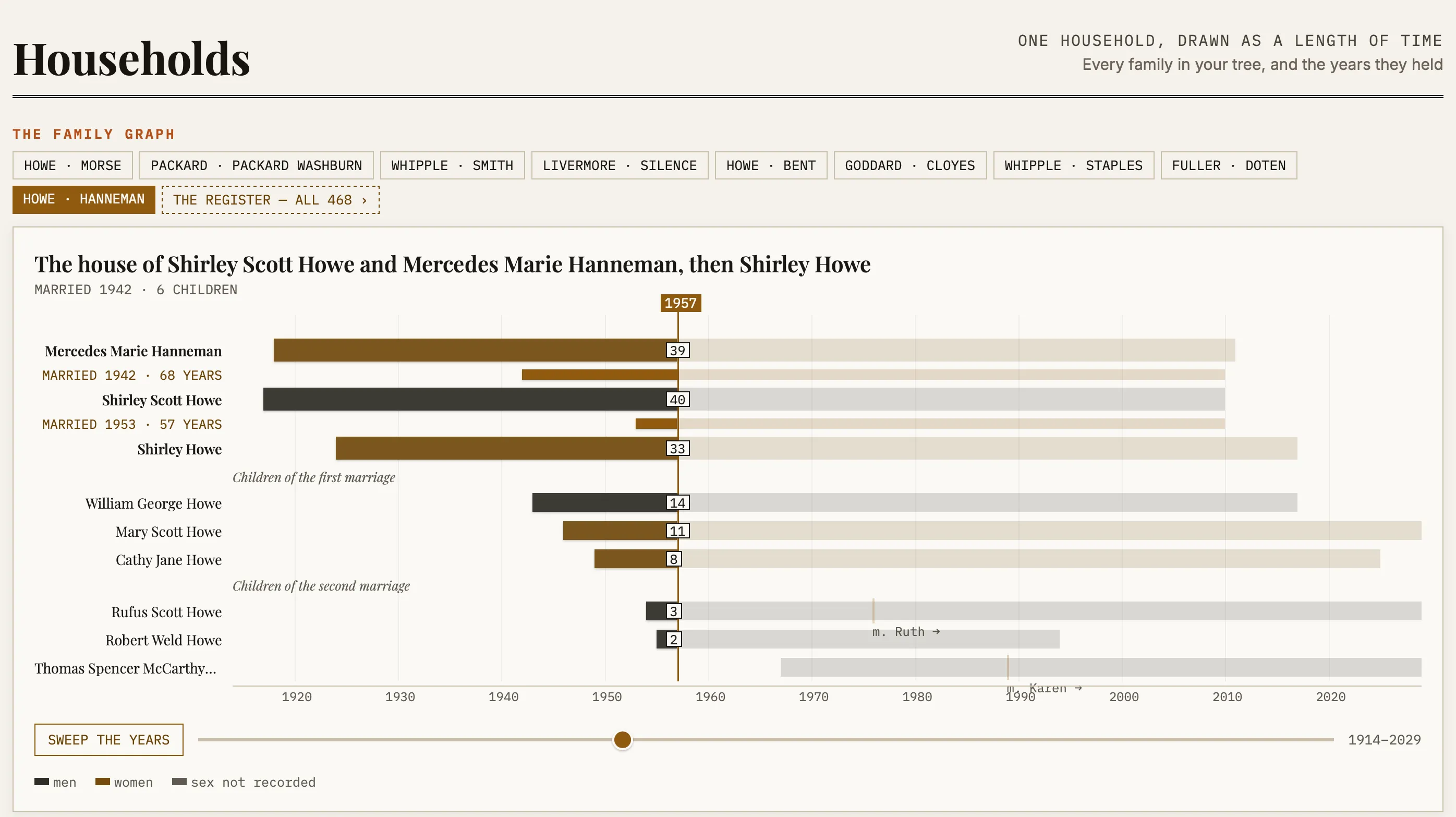
The Family Stage
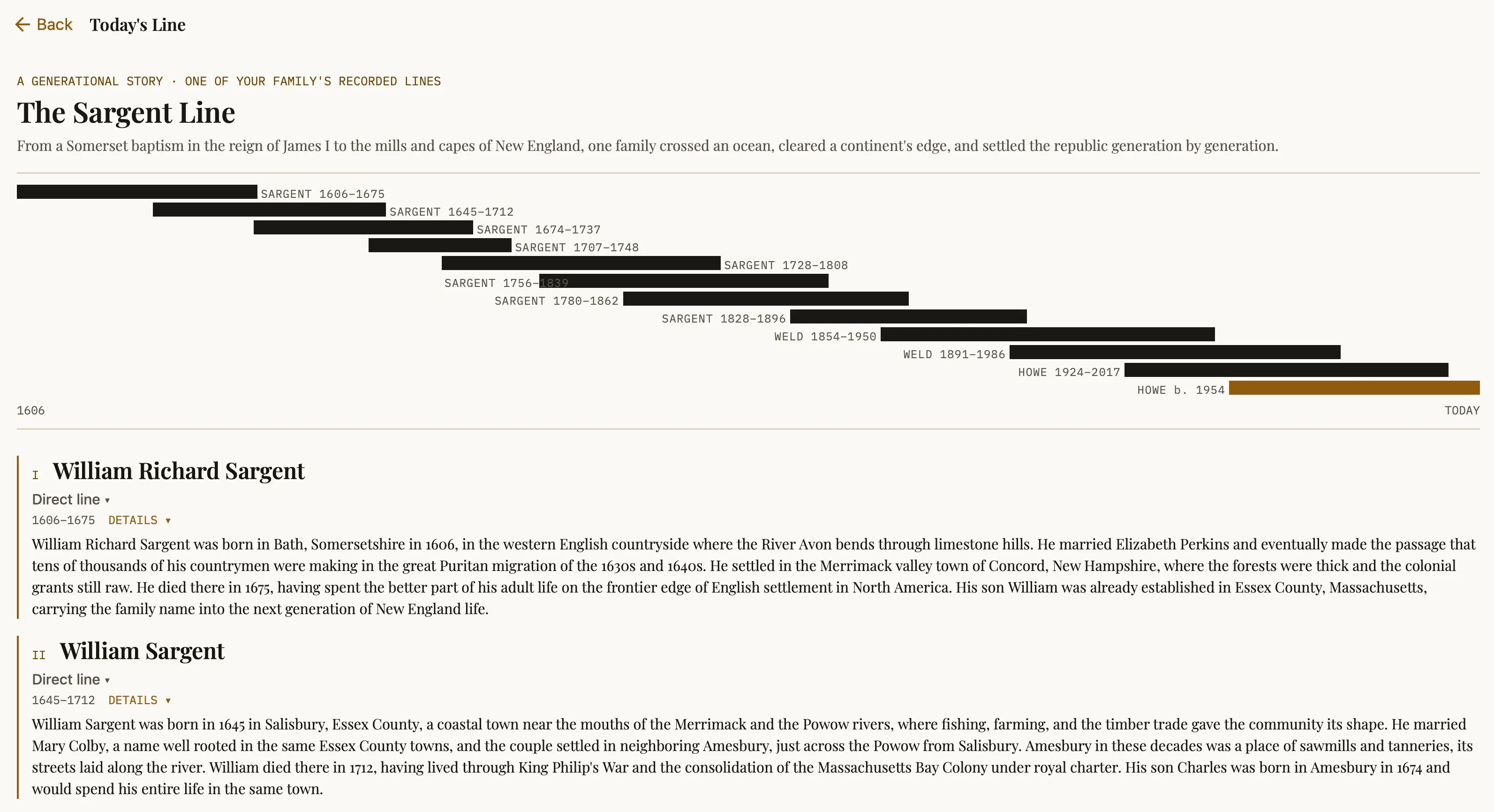
One household drawn as lifelines against falling time. Sweep the years and watch a century unfold.
The Portrait
Every person opens as a portrait of their family — parents, siblings in true birth order, each marriage and its children.
Biographies
Life narratives written from your tree's own data and real historical context, built to avoid unsubstantiated claims.
The National Archives
US federal records matched to your ancestors — draft cards, naturalizations and more — each awaiting your judgment.
Orphan Records
Finds the people sitting disconnected from your tree and suggests where they might belong.
The Field Guide
Every screen explained, one tap away, whenever you need it.
GEDCOM Refresh
Bring in a newer export and Witness reports what your research changed — people added, dates filled, brick walls broken — then replaces the saved copy instead of duplicating it. In the browser version today; on iPhone and iPad in the next release.
Worksheets
Take Tree Health findings and orphan records out as a spreadsheet, with the GEDCOM id for each row so you can work through them wherever your tree actually lives.
Your Findings
Every judgment you make — records fixed, patterns ruled not an error, archive verdicts — gathers in one place on Research instead of staying on the screen that produced it.
Getting To Work
The shape of your tree in figures: lifespans across the centuries, deaths by decade, marriage ages, and your commonest names. Best on a wide screen.
Coming
Family Street View
Walk through a rendering of the places your ancestors lived. Proof of concept built; production version in progress.
Family Wrapped
An annual, personal summary of your family's year in history.
Getting Started

Upload a GEDCOM file. That's it.

01
Export
Export a GEDCOM file from Ancestry, MyHeritage, or whatever software holds your tree today.
02
Upload
Select the file in Witness. It reads the file and shows a quick preview — how many people, families, and places it found.
03
Confirm
Bring them into Witness. Your people, sources, and citations import together.
04
Mark yourself
Tell Witness which person is you, so relationships like "third cousin" or "great-grandmother" calculate correctly.
Done more research? Export a fresh GEDCOM and choose “Update from a newer file” — Witness shows you what changed before it replaces the saved copy, and your briefs and archive verdicts come across. That is live in the browser version today and reaches iPhone and iPad in the next release; until then, each upload there creates a new tree.
Your Tree Stays Yours

We store your file. We genuinely cannot read it.

That is a technical claim, not a promise about our intentions — so here is exactly how it works.

Encrypted before it leaves
Your original GEDCOM file is sealed with an AES-256 key generated on your iPhone and held in the iOS Keychain. The file is encrypted before upload, so what reaches our storage is a blob we have no key for.
The recovery code is the key
You are shown it once, to save. It restores your file on another device — and it is the only thing that can. We do not hold a copy, which is the whole point, and also the risk: lose your device and your recovery code, and the stored file is unrecoverable ciphertext.
Read-only, always
Witness never writes back. Your tree on Ancestry, FamilySearch, or in your desktop software is untouched — Witness reads a copy and analyses it. Nothing it concludes can damage years of research.
Living people stay private
Anyone who appears to be living is excluded from AI-written stories and from anything shareable. Their records stay inside your account.
One honest limit: the encrypted vault relies on the iOS Keychain, which has no browser equivalent. In the web version the vault is simply absent rather than quietly downgraded to something weaker — your tree still imports and works, but the original file is not kept for you. Full detail in the privacy policy.
Pricing

$19.99 a year. Everything included.

One subscription, one price — every feature on this page, on every device you sign in on. The first week is free, and if you cancel during it you are not charged.

$19.99 / year
1 week free, then $19.99
That is about $1.67 a month — less than the annual plan of any major tree-hosting service, because Witness is not trying to replace one. It sits on top of the tree you already keep.
Start the free week
Auto-renews annually until cancelled. On iPhone and iPad, billing is handled by Apple and you can cancel any time in your Apple Account settings. See the terms for the full detail.
Questions

The things people ask first.

Does Witness work with Ancestry, MyHeritage, or my desktop software?

Yes — through the GEDCOM file each of them exports. GEDCOM is the standard interchange format for family trees, and Witness reads it from Ancestry, MyHeritage, Findmypast, RootsMagic, Family Tree Maker, Legacy Family Tree, Gramps, or anything else that produces one. Witness has step-by-step export instructions for the main platforms built into the app. There is no account linking and no password sharing: you export a file, you import a file.

Will Witness ever change my tree?

Never. Witness is read-only by design — your GEDCOM file and your tree on Ancestry, FamilySearch, or anywhere else are untouched. When your research grows, export a fresh GEDCOM and re-import it.

Where is my GEDCOM data stored, and can you read it?

Your original file is encrypted on your iPhone with an AES-256 key that is created there and never sent anywhere, then uploaded as an unreadable blob. We store it and cannot open it. The tree's structured facts — names, dates, places, sources — are held in your account so the app can query them, protected by per-account access rules. Living people are excluded from AI-written stories and anything shareable.

What does Witness cost?

$19.99 per year, with a 1-week free trial for new subscribers. That is the only price — there is no free tier, no per-feature upgrade, and no add-on. Cancel during the trial and you are not charged.

Is there an Android version?

Not as a native app. Witness ships on iPhone and iPad, and there is a browser version at app.witnesslives.com that works on Android and desktop. The main difference is the encrypted vault for your original file, which depends on the iOS Keychain and so is iPhone and iPad only — everything else works in the browser.

What happens if I lose my recovery code?

If you lose both your device and your recovery code, the stored copy of your original GEDCOM file cannot be recovered — by you or by us. That is the direct cost of us not holding a key. Your imported tree is still in your account and still works; it is the archived original file that becomes unreadable. Save the recovery code somewhere you would keep a password, and re-import from your own GEDCOM if you ever need to start again.

What is Tree Health?

Twenty-two data-integrity checks, adapted from the FTAnalyzer catalog used by serious desktop researchers, run over every person, family, and date in your file. They catch the things that are impossible rather than merely unlikely — a person recorded as dying before they were born, a marriage after a death, siblings born impossibly close together, a date in the future. Each finding is one tap from the person it concerns.

Do my photos come across?

No — photos do not travel in a GEDCOM file. The file carries your tree's facts and structure; images stay on the platform where you added them. Witness illustrates your family with maps, timelines, and historical context rather than with pictures you would have to re-upload.

Why is the Map sparse right after I import?

Place coordinates are worked out after the import finishes, and the geocoding service runs at a deliberate pace — a large tree with thousands of places can take a couple of hours to fully light up, while a small export takes minutes. Everything else works immediately: the weekly digest, the question library, biographies, and relationships. The map fills in as places are located.

Why does someone in my tree show no relationship to me?

Every relationship label is computed from your home person, by blood. People with no label are either your in-laws' families — connected by marriage, not blood — or people in a branch that was never joined to the main tree. GEDCOM files often carry research fragments like that. A missing label is honest, not broken.

Something looks wrong and it isn't here? Genealogy data is messy — that's half the fun. Write to support@witnesslives.com and a real person will dig in with you.
WITNESS witnesslives.com
support@witnesslives.com
App Store · Pricing · FAQ · Privacy · Terms